Installing a real estate sign rider is straightforward when the rider, sign panel, post, and hardware were designed to work together. The safest approach is to confirm compatibility first, then position and fasten the rider without forcing, drilling, cutting, or bending components that do not align.
The steps below are for agents and listing teams installing a rider on a For Sale or similar real estate sign. They cover fit checks, measurement, outdoor material selection, fastening, final inspection, and the point at which ordering a compatible replacement is better than improvising.
Quick summary

- Inspect the rider, sign panel, post, mounting holes, and available hardware before starting.
- Measure the rider and hole positions instead of assuming that dimensions or spacing are universal.
- Proceed only when the rider is suitable for the sign system and the mounting points align.
- Position and centre the rider before tightening any fasteners, then check straightness, stability, and readability.
- Stop if the panel is damaged, the hardware does not fit, or the holes do not line up. Request a confirmed replacement or custom option instead.
1. Check the rider, sign, and post before installing
Start by laying out every component on a clean, stable surface. Check the rider for cracks, warping, peeling, damaged edges, or unclear printing. Inspect the sign panel and post for damage, loose parts, corrosion, or movement that could affect the finished installation.
Next, identify how the rider is intended to attach. Look for mounting holes, clips, slots, brackets, or another defined connection point. Do not assume that a rider from one sign system will fit another simply because the panels look similar.
Confirm the branding orientation before you continue. The name, phone number, logo, status message, or other information should face the intended viewing direction and remain upright when the rider is attached. If the post is unstable or the main sign is damaged, pause the rider installation until those issues are resolved.
2. Measure the rider and mounting points

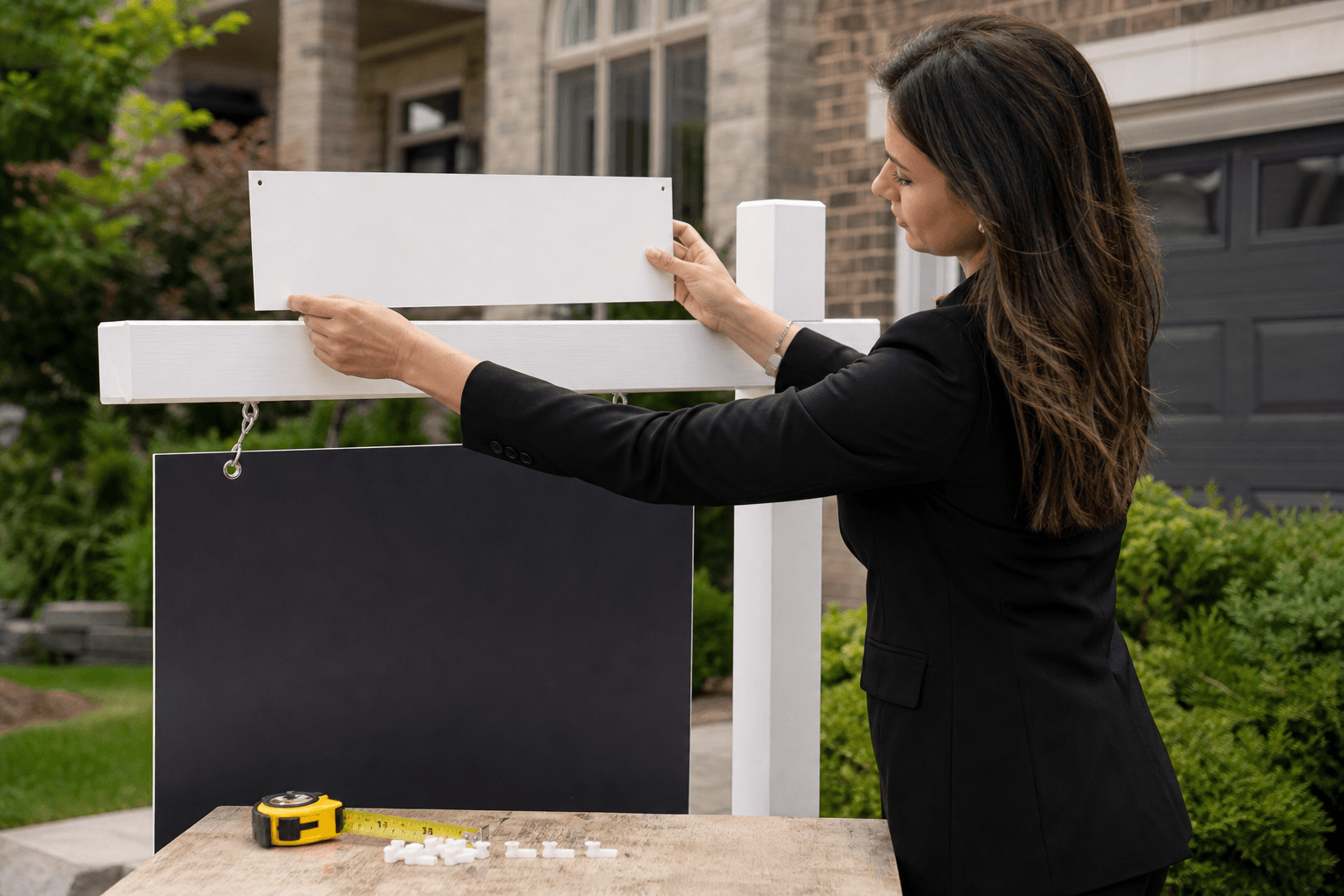
Measure the rider’s height and width, then record the distance between its mounting points. Measure from the same reference edges each time so you can compare the rider with the sign panel and post accurately.
Check the sign panel’s available space, the location of its holes or attachment points, and the position of the post hardware. The goal is not merely to confirm that the rider is close in size. The mounting points must align without placing pressure on the panel or leaving the rider tilted.
Before drilling or fastening anything, review real estate sign sizes and rider dimensions so the hardware lines up cleanly with the panel. The specific sign system still takes priority because dimensions and hole spacing are not universal.
Stop point: If the rider dimensions, mounting holes, or post arrangement do not match, do not enlarge holes or create new ones as a quick fix. Confirm the specifications with the supplier or choose a rider made for that sign system.
3. Confirm material and hardware compatibility
Outdoor signage needs materials that can handle the conditions in which it will be displayed. Check whether the rider is intended for outdoor use and whether its finish is suitable for exposure to rain and sun. A weather-resistant, laminated, or otherwise outdoor-suitable rider is a better starting point than a material intended only for indoor use.
Also check the fasteners or clips. They should fit the rider, sign panel, and post connection without forcing the material, obstructing the message, or leaving excessive movement. Use the hardware supplied for the sign system where available, and follow any product-specific instructions rather than substituting an unrelated fastener.
For installations exposed to rain and sun, choose weather-resistant rider signs that are compatible with standard real estate posts. The product information describes custom riders as weather-resistant, customizable, easy to install, and available for use with standard real estate posts.
Proceed when the outdoor material, mounting points, post, and hardware are all confirmed. If one part remains uncertain, stop and request a design or product compatibility review. Forcing a mismatch can damage the rider or sign and may leave the message crooked or insecure.
4. Position the rider before fastening it
Place the rider against the sign or post in its intended position without fully tightening anything. Check that the message is upright, the rider is centred, and the sign’s main branding and contact information remain visible.
Align the mounting holes, clips, or brackets by hand. Look at the installation from the front and from the main direction of approaching traffic. A rider can appear centred from one angle but sit too high, low, or to one side when viewed straight on.
Check the space around the rider as well. It should not cover essential information on the main panel, interfere with a frame, or press against another sign component. If the rider needs to be held in place while you check alignment, use a temporary support rather than tightening one side first and pulling the other side into position.
5. Fasten the compatible rider without forcing it
Once the mounting points align, attach the rider using the compatible clips, brackets, or fasteners for that sign system. Start each connection before tightening any individual point fully. This keeps the rider adjustable while you confirm that it remains level.
Tighten the connections evenly and only as much as the hardware and material require. The rider should be secure, but excessive force can deform a panel, damage a hole, crack a rigid material, or distort the printed surface.
Do not drill new holes, cut the rider, bend a bracket, or force a screw through an unsuitable location unless compatibility has been specifically confirmed. Those changes may weaken the component or create a fit that looks acceptable initially but does not hold properly outdoors.
6. Complete the final visibility and stability check
After fastening, step back and inspect the installation from several angles. Confirm that the rider is straight, the message is readable, and the logo, phone number, status, or other important information is not hidden by the post or sign frame.
Gently check for unwanted movement without applying excessive force. Look for loose fasteners, lifted corners, a bowed panel, or pressure around the mounting holes. If the rider shifts, identify whether the issue is a loose connection or a fundamental mismatch. Do not compensate for a poor fit by over-tightening.
Finally, inspect the full sign assembly. The rider should complement the main For Sale or listing sign, not obscure it. Weather-resistant custom riders and real estate sign panels are designed to support outdoor marketing, but the installation still needs to be checked whenever a sign is moved, replaced, or reconfigured.
When to install, replace, or stop
| Condition | Best next step |
|---|---|
| Mounting points align and the rider is in good condition | Install it with compatible hardware and complete the final check. |
| Mounting points are close but do not align | Stop and confirm specifications. Do not enlarge holes or force the rider into position. |
| The rider is faded, cracked, warped, or peeling | Replace or reprint the rider rather than attaching a visibly damaged component. |
| The existing sign panel is sound but its face is outdated | Ask whether refacing or a replacement panel is suitable for the existing system. |
| The post or frame is unstable | Resolve the post or frame problem before adding a rider. |
| The material is not confirmed for outdoor use | Choose a weather-suitable option or verify the material before installation. |
| The hardware or post type is unclear | Pause and request compatibility guidance instead of improvising. |
Troubleshooting common sign rider problems
The rider is crooked
Loosen the connections slightly, realign the rider using the mounting points, and tighten evenly. If it becomes crooked again because the holes or hardware do not match, stop treating it as an adjustment problem. The rider may need a compatible replacement.
The fasteners feel loose
Check that the fasteners are the correct type and that they are engaging the intended mounting points. Inspect the holes and surrounding material for cracking or enlargement. If the material is damaged, replacing the rider or panel is safer than relying on excessive tightening.
The rider does not fit the post
Compare the rider’s dimensions and mounting arrangement with the post system’s specifications. A rider described as compatible with standard real estate posts may still need to match the particular panel and hardware arrangement. Request confirmation before modifying either component.
The branding is unclear or partly hidden
Reposition the rider so the message faces the intended viewing direction and does not cover important information on the main sign. If the design itself is crowded, request a revised layout rather than installing a version that is difficult to read.
The rider moves after installation
Recheck the hardware, mounting holes, panel condition, and post stability. If movement comes from a damaged panel, unstable post, or incompatible connection, remove the rider and resolve the underlying issue before reinstalling it.
Sign rider compatibility checklist
- The rider’s height and width match the available sign space.
- The mounting holes, clips, or brackets align with the intended sign system.
- The post and frame type are known and in good condition.
- The available hardware is designed for the rider, panel, and post.
- The material and finish are suitable for the expected outdoor exposure.
- The rider is free from cracks, warping, peeling, and damaged edges.
- The message, logo, and contact information will face the correct direction.
- The rider will not cover essential information on the main sign.
- No drilling, cutting, bending, or other modification is needed without confirmation.
FAQ
How do I know whether a sign rider will fit my existing real estate post?
Compare the rider’s dimensions and mounting points with the sign panel, post, and hardware arrangement. A visual similarity is not enough. The holes or connection points should align without force, and the rider should remain level when attached.
Can I install a new rider on an older For Sale sign?
Possibly, if the existing sign panel and post are sound and the new rider is compatible with their mounting system. Inspect the older sign for cracks, warping, loose hardware, and outdated branding before proceeding.
What should I do if the rider mounting holes do not line up?
Stop installation and confirm the rider and sign specifications. Do not enlarge the holes, drill through the panel, or force a fastener into a new position unless the modification has been specifically approved for that system.
Are weather-resistant rider materials necessary for outdoor listings?
Outdoor exposure makes weather suitability an important consideration. Choose a rider described for outdoor use and check its finish before installation. The rider must still match the sign and post hardware.
When should I order a custom rider instead of modifying an existing sign?
Choose a custom rider when the required message, dimensions, branding, or mounting arrangement is not supported by the existing component. A confirmed compatible option is preferable when modification would require drilling, cutting, bending, or forcing mismatched hardware.
Conclusion: Proceed only when the fit is confirmed
Good sign rider installation starts before the first fastener is attached. Inspect the sign and post, measure the rider and mounting points, confirm the outdoor material and hardware, position the rider carefully, and perform a final stability and visibility check.
If everything aligns, proceed with the compatible rider. If the panel is damaged, the hardware is uncertain, or the mounting points do not match, replace or reface the affected component instead of improvising. Top Realtor Sign & Print offers real estate signage, custom riders, in-house design support, and an online design tool for agents who need a compatible, professionally branded option. Visit Top Realtor Sign & Print to review available signage and marketing materials.