One-sentence local note and how to use this checklist
If you need presentation folders for listing appointments, proposals, or open-house leave-behinds in Mississauga or the GTA, this seven-item checklist tells you which production and design choices matter most and what to confirm with your printer. Browse Top Realtor Shop’s presentation folders to see local options and request in-house design help when you are ready.
See presentation folders at Top Realtor Shop for product options and local pickup details: presentation folders.
1 Choose pocket style and capacity
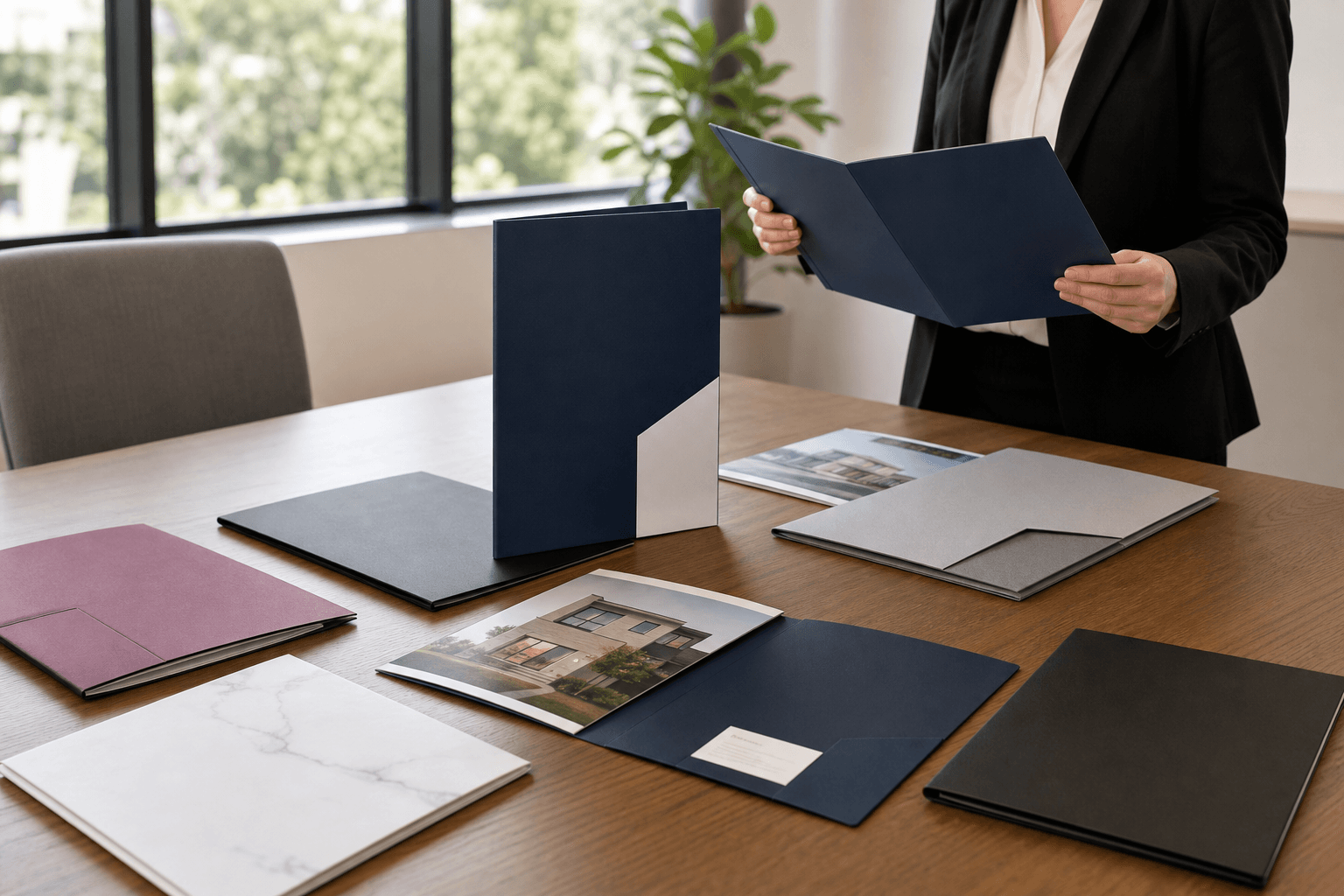
What to decide: single pocket, double pocket, or specialised pockets such as a CD slit, flap closure, or business card slot. Decide which side the pocket should be on for your presentation flow, and whether you need a gusset for thicker packets.
Why it matters
Pocket style controls how clients access materials during a meeting and how many documents you can leave behind. A double pocket keeps contract copies separate from marketing sheets, while a flap pocket secures loose items during transport.
Practical next steps
- List the documents you want to carry and how many copies of each you will include during a meeting.
- Decide if you prefer left or right pocket placement based on whether you are left or right handed while presenting.
- If multiple agents will use the folder, consider duplicate pockets or divider tabs for team materials.
Production note
Most pocket-style presentation folders carry roughly 30 sheets of standard copy paper per pocket, so plan pocket depth accordingly to avoid bulging or tearing. For this capacity guidance see printer recommendations on pocket folder tips from Company Folders.
Folder capacity and construction notes.
2 Select folder size and document fit

What to decide: finished folder dimensions so your most important documents lie flat and visible. Common choices include a 9″ x 12″ folder for 8.5″ x 11″ sheets, a slim 6″ x 9″ pocket for compact brochures, or custom sizes for oversized photos and MLS boards.
Why it matters
If documents are trimmed, folded, or not centred because the finished folder was the wrong size, the folder looks unprofessional and may obscure critical content such as pricing, maps, or floor plans.
Practical next steps
- Measure your largest document and allow at least 3 to 5 mm clearance on all sides, plus the pocket seam allowance.
- If you plan to include photo boards or legal-size paperwork, specify that early and request a dieline that reflects the finished size.
- Ask the printer to confirm whether pockets will overlap the printed interior design so you can adjust artwork accordingly.
Production note
Tell the printer the finished size, not the trim size of an artboard, and confirm fold placement and the pocket seam allowance so printed elements do not fall into a fold or get trimmed.
For additional guidance on folder sizes and usage see Company Folders’ overview of standard presentation folder dimensions.
Presentation folder dimensions and planning.
3 Decide on business card slot and internal organisation
What to decide: include a business card slot, multiple card slots for a team, divider tabs, or extras like a pen loop or receipt pocket. Specify whether the slot is horizontal or vertical and which pocket it belongs to.
Why it matters
A visible card slot increases the chance of follow-up because clients can immediately take your card. Internal organisation helps clients find the most persuasive pages first and keeps contractual pages protected and separate from marketing collateral.
Practical next steps
- Provide a sample business card to the printer as a fit reference when asking for a slot.
- Sketch how you expect a meeting to progress and place the card slot so it is seen before the conversation ends.
- If you represent a team, plan multiple card slots or a labelled tab for each agent to avoid confusion during handoffs.
Production note
Specify slot dimensions on your dieline and request a proof so you can confirm fit. If you want a pen loop or gusseted receipt pocket, note that these features add finishing steps and may increase lead time.
4 Pick finishes that align with listing-level branding
What to decide: uncoated, satin, soft touch, spot UV on selective areas, or metallic foil accents. Choose finishes that reflect the property tier and your personal brand without overwhelming printed information.
Why it matters
Finishes change the tactile and visual impression of the folder. Soft touch coatings convey premium quality and reduce glare during indoor presentations, while spot UV highlights a logo or hero photo. Foil gives a luxury accent for higher-end listings, but it requires precise registration and can increase production time.
Practical next steps
- Decide which element should stand out, such as a logo, a property photo, or a headline, and reserve spot UV or foil only for that area to avoid visual clutter.
- Request a finish mockup or a digital proof showing how the spot UV and foil will register with your artwork.
- Align finish choices with other listing collateral, such as business cards and For Sale signs, so your brand is consistent across touchpoints.
Production note
Ask the printer about registration tolerances for spot UV and foil, and expect slightly longer production time for multiple specialty coatings. For design principles that emphasise purposeful finishes and layout choices see PrintVenue’s folder design guidance.
Design and finish tradeoffs for presentation folders.
5 Plan folder contents and sequencing for realtor meetings

What to decide: the exact documents you will include and the order that moves a client toward a decision. A concise, decision-focused packet is better than an overloaded folder.
Why it matters
Folders are most effective when each document serves the meeting objective, such as securing a listing agreement or moving a buyer toward an offer. A clear sequence prevents clients from getting lost in details and keeps the conversation focused.
Practical next steps
- Prepare a one-page executive summary to lead the packet, followed by property highlights and high-quality photos.
- Include a pricing and commission sheet, a timeline for marketing and closing, and one short, relevant case study that shows past success in similar listings.
- Place a business card slot where it is visible at the meeting close and leave an optional FAQ or disclosure sheet in the pocket for clients to read later.
Production note
Design the cover to signal the first takeaway, and ensure the inside pocket leaves space for an optional disclosure or signature copy. For a recommended contents checklist used in sales meetings see Gallery Connection’s presentation folder guide.
Recommended folder contents for sales meetings.
6 Prepare design and file-ready specifications
What to decide: will you use Top Realtor Shop’s in-house design, the browser-based editor, or supply print-ready files. Pick the path that fits your skills and timeline, then follow clear file-prep rules to avoid delays.
File-ready checklist
- Preferred file types: print-ready PDF, exported as PDF/X where available, or high-resolution flattened PDF.
- Colour mode: CMYK for print. Convert spot colours only when requested by the printer.
- Resolution: 300 dpi for images at final print size.
- Bleed: typically 3 mm or 0.125 inch bleed beyond the trim edge. Keep important content inside a safe area at least 5 mm from the trim.
- Fonts: outline fonts or embed them in the PDF. Flatten layers when the printer requests it.
- Special finishes: provide dielines for die-cuts, and separate spot UV or foil layers as individual files if requested.
For technical setup of pocket folder files and dielines see GreenerPrinter’s pocket folder file guide, and review design tips that emphasise purposeful content from PrintVenue.
Pocket folder file setup guide, folder design principles.
Production note
If you need custom pockets or spot finishes, supply dielines early and request a PDF proof. When in doubt, use Top Realtor Shop’s in-house designers or the online editor to avoid common file-prep mistakes and to speed approval.
7 Confirm turnaround, pickup options and how folders fit packages
What to decide: production timeline and whether you require local pickup or expedited delivery. Decide if you will order folders alone or as part of a realtor package that bundles signs, flyers, and folders for a single listing.
Why it matters
Folders that include specialty finishes or die-cuts require extra finishing time. If you have an urgent listing or an open house, confirm lead time before you commit to printing so you do not miss a deadline.
Practical next steps
- Ask the printer for a realistic production schedule that covers print, finishing, and binding steps.
- If you need fast turnaround, check whether standard folders can be expedited or if a simplified finish reduces lead time.
- Consider ordering folders together with flyers or business cards in a Realtor package to simplify logistics and ensure consistent branding across items.
Production note
Top Realtor Shop advertises fast turnaround and same-day pickup on select products, and the team can advise whether a folder run can be expedited or included in one of their Realtor packages. Confirm pickup times and proof approvals before production begins to avoid delays.
See local options and request design assistance at Top Realtor Shop’s main site: Top Realtor Shop and the presentation folder product listing at presentation folders.
Frequently asked questions
How many sheets can a standard pocket presentation folder hold
A standard pocket typically holds about 30 sheets of 80 to 100 gsm standard copy paper per pocket. If you plan heavier stock or many inserts, discuss a gusseted pocket or reinforced construction with your printer. See technical folder tips at Company Folders for guidance.
Can I add a business card slot or pen loop to a custom folder
Yes. Most printers offer card slots and additional features such as pen loops and flap closures. Provide the card dimensions and preferred placement on your dieline, and ask for a proof to confirm fit before printing.
What file formats and bleed requirements should I provide for print-ready folders
Provide a print-ready PDF, ideally exported as a PDF/X standard, with all images at 300 dpi, CMYK colour mode, and at least 3 mm bleed. Supply separate layers or files for spot UV or foil where requested. GreenerPrinter’s pocket folder file guide has a practical checklist for dielines and bleed.
How quickly can Top Realtor Shop produce presentation folders and is same-day pickup available for urgent orders
Turnaround depends on pocket style and finishes. Specialty coatings and die-cuts add time. Top Realtor Shop highlights fast turnaround and same-day pickup for select items and can advise whether a folder run is eligible for expedited production. Contact the shop directly to confirm timelines and proof approvals.
Ready to order or need help with artwork? For local design support, proofs, and pickup at the Mississauga location, contact Top Realtor Sign & Print at their website: Top Realtor Sign & Print.